|
| |
HRPT Programs
 HRPT Reader download HRPT Reader download
 HRPT
Reader registration - help support continued development!
HRPT
Reader registration - help support continued development!
 Sample
results Sample
results
|

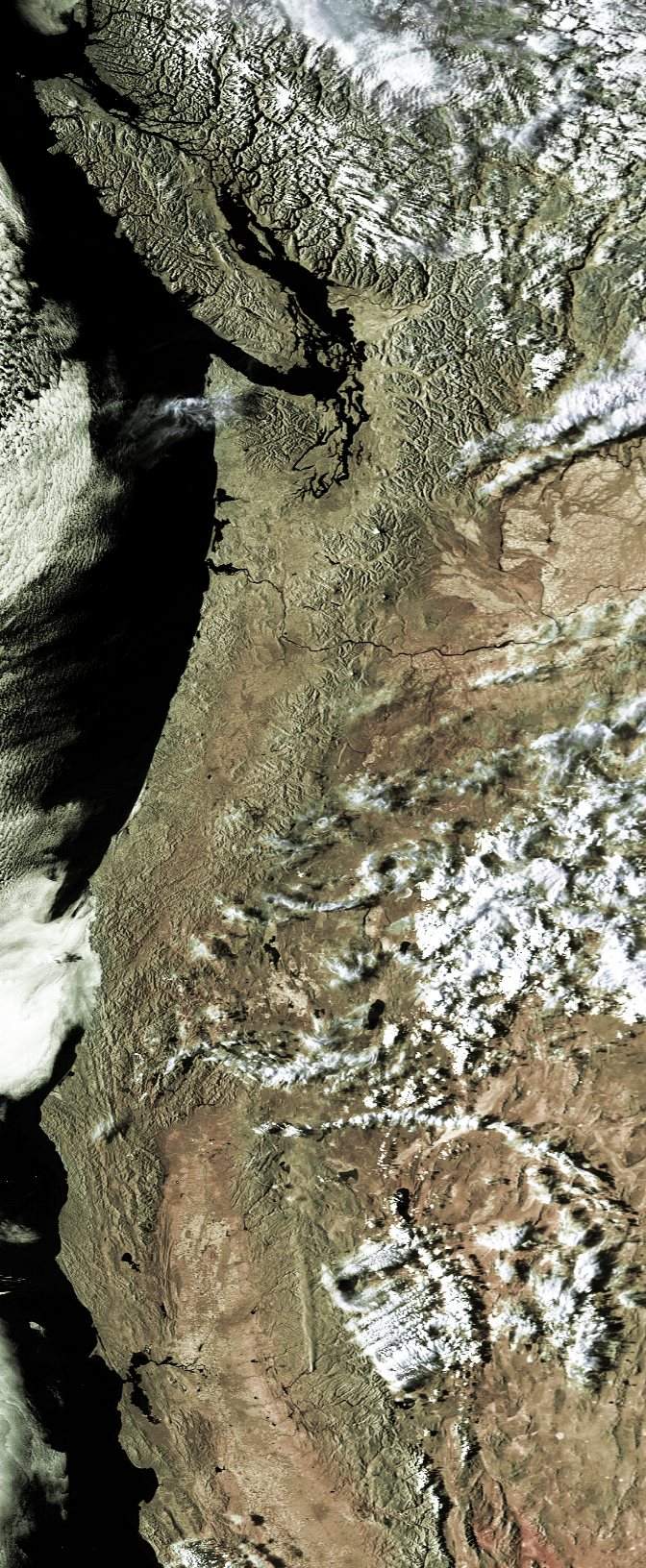
USA West Coast from NOAA data, click for full image
|
I have produced two easy-to-use programs that may be of interest to
HRPT enthusiasts - one is a reader for HRPT files with the same colour mapping from
temperature as SatSignal and GeoSatSignal,
and the second carries out geometric
correction from the scanner view to a photographically correct view (also
built into the reader). The HRPT Reader program is used within the
industry and by research institutions for data interpretation. Indeed, it is used by NASA
itself!
|

The HRPT Reader at work
|
What is HRPT? It is the basic sensor data that is transmitted at reduced
resolution as APT data from NOAA polar orbiting weather satellites. There is
approximately ten times the resolution in HRPT data as there is in the APT data and
you can see some sample HRPT
images here. Don't worry, it's only a small download, not
several megabytes! You don't need any kit to receive HRPT data - it is available off
the Internet from the comprehensive CLASS
archive (formerly called the SAA) as well as directly through EUMETCast. Les Hamilton has
kindly provided a copy of his article from the GEO
Quarterly on Using CLASS (formerly the SAA).
I also have provided basic
notes on using the SAA (also in French and German). The HRPT Reader can also read data from the
FENGYUN FY1C and FY1D satellites. EUMETSAT
have made data from the NOAA-19, and Metop satellites available
via their EARS AVHRR service, and my AVHRR
Manager can assemble composite pass files from the segmented data sent
over EUMETCast.
Please note that these programs are
only supported with registration,
but I value all feedback. Simply copy the .EXE files from the archive to a
folder of your choice and run. Registration
is required for commercial use or support, and you can also register
if you want to say "thank you", when you will get extra facilities in
return for your payment.
|
Sample HRPT Sites
- Various
- USA
- UK and Europe
- New Zealand
- Hardware links
HRPT Reader
This program reads HRPT files in the NOAA Level 1B, TimeStep, SSB/Orbit, L1F and
NOAA95 formats, amongst others. It can also read Meteor-M
N1 raw 256-byte frame data. From the SAA (Satellite Active Archive -
now CLASS) it
can read LAC, GAC FRAC and HRPT data formats. The program will allow you to play with making
false colour images by combining the five or more available channels into red, green, and
blue or, if you prefer, by taking one of the visible channels as brightness and one of the
IR channels as colour. When enough channels are available, you can extract water
vapour and vegetation data. You can save what you create,
and you can also save an APT-size image which may be useful as a thumbnail when compressed
to JPEG. The program attempts to handle missing bits (which create white or black
marks on the image), but in all honesty you would be better off buying a copy of Paint
Shop Pro to do this. There is a free self-help SatSignal
Group that you can join where other users of the software can be contacted and ideas for updates are
discussed.
Convert
your HRPT images to standard map projections with the GroundMap
program.
If you have a requirement to produce "standard" L1B
data from your raw receiver system files, please contact me directly.
This program is free for
non-commercial use, but if you wish to say "thank
you", if you use the program commercially, if you want access to certain
advanced facilities, or if you need technical support, you
should register
the HRPT Reader. Extra facilities are provided in return for your
registration payment.
You can also register the program as part of the HRPT
Toolset, which includes additional programs to enable reception of NOAA-17
and NOAA-18 data over the EUMETSAT
EARS AVHRR service providing an extended Europe-wide reception region.
In addition to access to technical support, the advantages of
registration include facilities such as:
- See the corrected image without having to exit the program
- Enhanced Batch-mode operation for completely automated processing
- Multi-page printing
- Maintenance of simple text list of processed files
- MapGen format boundary data is supported
- Saving of location data for subsequent map projection processing with GroundMap
- Overstamp of images with date and time information for cataloging
- Naturalistic colouring of the vegetation display
- Display of NDVI at cursor location on vegetation display
- Use your own colour lookup tables (CLUTs)
- User control of individual RGB channels
- Display of standard file L1B name on Direction form - swipe for easy renaming of downloaded files
- Add optional grid-line marker at the north and south pole
- Optional overlay of fire pixels on the false-colour image
Requirements
Memory is vitally important to this program. Whilst the program
may work in 32MB, processing times will be somewhat extended, possibly in the order of several tens of
minutes. Going up to 128MB will bring the time down to a few minutes per file,
512MB speeds the program to about 6s per 80MB HRPT file with a Pentium III 1GHz.
Processing less than all five channels gives further speed gains in low memory
systems. Measured timings are given in the program's Help file. If you get error messages about missing DLLs when
you try to run the HRPT Reader, please consult the library notes
page.
Oleg Gerashchenko has kindly made his MetFY3x Processor software
available for processing CADU frames from the Metop-A/B and FY3A/3B satellites
and unpacking them into a format which the HRPT Reader can process. At the
time of writing, this facility is in release V2.10.8 of
the program. Oleg's software may be downloaded here:
http://www.sat.cc.ua/page5.html
This software is for those who have a direct reception
station, and wish to extend an existing NOAA-18/19 capability to the new
satellites which use a different data format.
| V3.0.0 |
New version allowing more memory in 64-bit
(Windows-7/8 systems with more than 4 GB RAM, not supported on XP/64 or
Vista/64, should work on all 32-bit Windows [XP and later]), Options|Max
Pass Zoom minutes extended up to 36, handle Australian ASDA PVL files
(named: hrpt_20131121_123859_16a_dar.native, both compressed 10-bit and
uncompressed 16-bit supported), identify 16-bit .RAW16 format Metop-B
files correctly.
|
| V3.0.2 |
Add View, Go to location ... option (enter
location in decimal degrees, latitude -90.0..+90.0, longitude:
-180.0..359.9, north/east are positive values, south/west negative, click
on the "Go!" in the left column, need valid lat/lon otherwise
"Go!" fails, image moves to try and centre the location, cursor
flashes to highlight new location).
|
| V3.0.4 |
Add Histogram Equalise (mild) option,
experimental support for Meteor-M-N2 (file extension .MN2, still
some vertical lines, mapping is well out at the moment, need more
information on scanner parameters, more sample files would be
appreciated), support FY-3C.
|
| V3.0.6 |
Add enhanced NOAA BD thermal LUT, support .GZ
compressed files (uncompressed & writes back to source directory,
requiring write access), recognise .LAC as pre-KLM if otherwise unknown,
recognise any .native extension, accept .native files without the header,
recognise .native files containing Quorum data, add support for .asda
files, add support for HBU data (a mix of .native externally and 16-bit
internally), more detail on file used for Kepler data, trap bad boundary
overlay data, provide estimated thermal calibration when calibration data
is missing but only for Metop-A and Metop-B, updates for Meteor-M N2 data
in .DAT format from Oleg via MetFy3x.exe (suppress "bad frames"
message, approximate corrected view and save corrected functions), update
View|Corrected for Windows-10, added Melbourne to the stations.dat file.
|
| V3.0.8 |
Add enhanced NOAA BD1 thermal LUT, provide
user-defined SST palette (provides better SST detail, 256 entries coded
R,G,B covers the currently defined temperature range, a sample palette is
provided: sst-lut.pal, can be read in batch mode from the command-line: -sstSST-PAL.pal:corr.jpg,
and specify a temperature range on the command-line too:
-sstSST-PAL.pal(15,25):corr.jpg), detect RAW16 satellite type for NOAA-19,
fix error with "VI" mode and blank video, preliminary support
for unpacked Meteor-M N2 data (Rob Alblas .DAT files with header
preserved, Oleg .MN2 files, new file has .MSU2 extension, same date),
reduce chances of "1899" dates appearing on saved images or in
processed.lst, clarify timestamp option, warn more strongly about missing
Kepler data.
|
| V3.0.10 |
Start Metop-C support (no thermal data yet), decode more
Metop-C filenames, support some COA-format AAPP files, handle evening pass
FY3 data better (for overlays), recognise satellite ID 1 as MY-3C, add
Help|Support menu item.
|
Beta version: This program is under continual
development - check here
for the latest update.
UTILISATION DE l'AIDE EN FRANÇAIS
En principe le programme devrait s'ouvrir avec les fichiers d'Aide en langue
française. Vous possédez également dans le même dossier un fichier d'aide
en langue anglaise ReadHRPT.chm. Si vous voulez utiliser l'aide en langue anglaise
il suffit d'enlever le fichier français ReadHRPT-fr.chm. Un conseil créez dans le
dossier ReadHRPT un dossier avec un nom approprié par exemple "language" et placer-y le fichier français.
Fermer et réouvrez le programme alors l'aide en langue anglaise sera activée.
Si vous voulez retourner à l'aide en langue française replacer le fichier français dans le dossier ReadHRPT.
Be sure to register the HRPT
Reader and support continued development.
A self-help group is available for this software here:
here.
Comprehensive Large Array-data Stewardship System (formerly NOAA Satellite
Active Archive) - http://www.class.noaa.gov
You need to register first, but it is free. This is a most comprehensive resource
with data going back many years. Full passes (HRPT), recorded passes for areas out
of the range of US ground stations (LAC), and whole earth passes at reduced resolution
(GAC) are available. Sometimes the early-afternoon European LAC pass for
NOAA-16
includes UK coverage. You can select by time, satellite, geographic location, pass
type and so forth. A must visit site! Les Hamilton has kindly
provided a copy of his GEO Quarterly
article on Using CLASS (formerly the SAA). If you find the site a little
daunting to start with, check out my basic notes
for using the SAA.
Il y a une version de cette information dans la langue française.
Direct link
You can find out where the LAC data for various satellites is due to be
recorded in the WXSAT mailing list and at:
http://noaasis.noaa.gov/NOAASIS/ml/schedules.html
For more information on HRPT, LAC and GAC, the following links have been
mentioned in the mailing lists:
http://www.arm.gov/docs/documents/project/er_0585/tichler/POES_4.html
http://www.arm.gov/docs/documents/project/er_0585/tichler/figure_2.html
but as these are now dead, try this instead:
http://projects.osd.noaa.gov/IJPS/product.htm
SMIS
There is a Russian SMIS site offering NOAA satellite data at:
http://d902.iki.rssi.ru/dataserv/engl/oper_e.shtml
Files are only available for about 48 hours, but are provided with
thumbnails, so you can see in advance what you are getting. These files are in L1F format,
with passes covering central and eastern Europe. Sometimes the satellite's position
allows good imaging of the UK.
This program takes a bitmap (in Windows 8-bit or 24-bit format) assumed to be
the full width of the AVHRR scanner - typically 2048 pixels), and applies a geometric
correction so that the resulting image is linear in ground co-ordinate terms. This
is necessary because the scanner takes picture samples at equal angles round its scan, and
the same angle at the edge will cover more ground than at the centre. Thus it is
necessary to stretch the edges of the picture to make it more realistic. As the
program currently deals with two large in-memory colour images, it is also provided
separately from the main HRPT reader. You might also want to run this
program if you have used an image processing program to remove speckle from an
image, which is best done with the un-corrected image.
Requirements
Windows 95, 98, NT 4.0 or 2000 and the following libraries are necessary for Correct
Geometry to function at all. If you get error messages about missing DLLs when you
try to run Correct Geometry, please consult the library notes
page.
| V1.5.0 |
Support MODIS data; recognised by images 2708 or 5416 pixels wide,
scan width of +/- 55 degrees, nominal satellite height: 705 km, nominal line-to-line step: 0.5km (2708 pixels),
nominal line-to-line step: 0.25km (5416 pixels). |
Download
CorrectGeometry V1.5.0 (2008 Feb 08; 14,539 bytes)
Experimental program to perform MODIS bow-tie removal and
swathe geometric correction. Currently an unsupported
beta program.
Acknowledgements
Many thanks to the kind folks who sent me HRPT files on CD to make this work
possible.
|
































 Les Hamilton's article on