

























|
|
Adding a FreeBSD NTP server based on an GPS 18 LVC deviceIntroductionI have been interested in precise timekeeping for a long time, and have run the excellent NTP software on my PCs for several years. Earlier, I had worked with Martin Burnicki of Meinberg on improving the performance of NTP in the Windows environment, however I remained envious of the reported precision of GPS systems with microsecond accuracies. When the low-cost Garmin GPS 18 LVC became available, quite a few people reported using this device with UNIX systems, and this triggered me into purchasing a GPS 18 LVC to see what I could do with it. There is now the even more sensitive GPS 18x LVC available. Initial tests with just the serial 4800 baud NMEA output and no PPS using Windows were disappointing. Whilst the device worked, the accuracy and jitter were no better than could be achieved with a broadband Internet connection and servers from the NTP pool. Realising that I had a spare old 133MHz PC, and hearing that UNIX could run on such a system, in January 2006 I decided to rise to the challenge. This note is the result! Although that PC used FreeBSD 5.4 which was the current version available at the time, when the PC finally failed I updated to a new Intel Atom system and Free BSD 8. If you are more into using NTP with Debian Linux, you may find this RJ Systems page of interest. The issues with Windows have now been largely resolved thanks
to the enthusiastic and tireless efforts of Dave Hart, so I have now also been
able to add precision timekeeping to
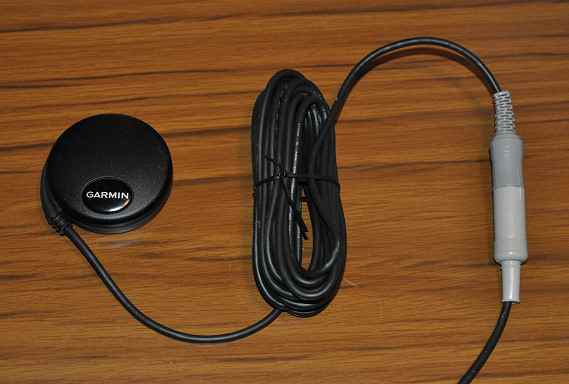
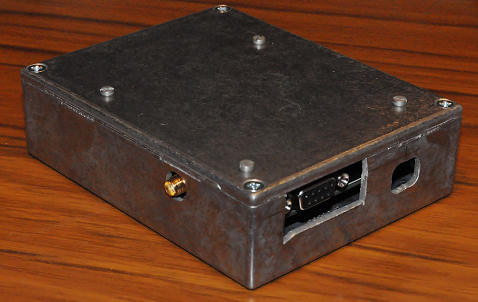
Windows also using the GPS 18LVC. HardwarePC Hardware1995 PC with 133MHz Pentium processor, 48MB memory, and 10GB ATA disk. Two serial ports (although one would be enough in this application). Top of the line kit in 1995! GPS Hardware
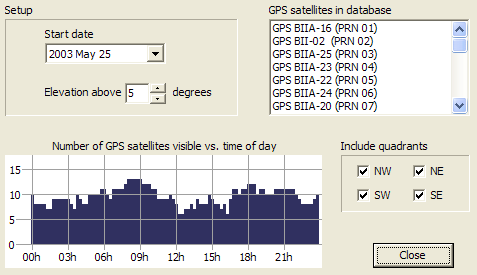
How do I know how many GPS satellites are visible?
An oddityDuring the initial tests of the GPS 18 LVC, after I had made up the RS-232 connector, I discovered that the Garmin supplied software would not connect to the device, even though the correct "sentences" could be seen via a terminal emulator. I didn't understand why this was the case, and so I wrote a small program to send the command string to switch the device to 19200 baud (or 4800 baud). Once I'd done that, the Garmin program worked OK. Perhaps this is a common problem, as Tony Hoyle reported:
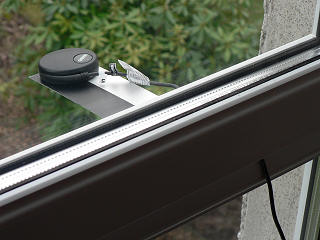
Initial setupFor a long while after I first started the GPS it didn't report a sensible position. I suspect it was taking a long time to read the almanac, and then to find the correct satellites. It did eventually sort itself out, but only after about 30 minutes of exposure to a good fraction of clear sky. The unit is quite a bit less sensitive than some of my other GPS devices, which have an add-on active antenna. An attempted tweakOn 2006 June 06, I attempted to set the GPS 18 LVC into 2D mode, which means that it assumes a fixed height and would only need three satellites for a complete fix (as my sensor can only see half the sky). This is done via the $PGRMC statement, setting the first value to "2", and the second to the sensor height in metres. I will see if this makes any difference (I'm also unsure if the command "stuck"). I don't think this made any difference, as I believe it only affects the initial acquisition. Moving the GPS 18 LVCThe opportunity later arose to put the unit on the slope of
the roof, which would mean that it only saw satellites above 25º elevation, but
over a 360º degree arc of the sky. This does appear better than the
previous 180º arc of about 5º elevation. No longer do I see spikes of
invalid GPS data (due to too few satellites), and now the winter is approaching
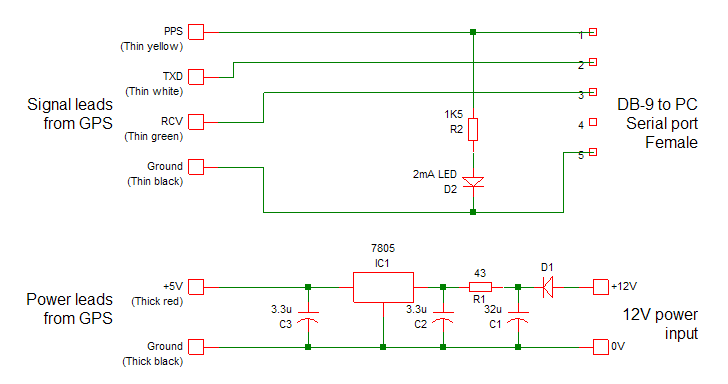
the central heating transients are, perhaps, the cause of worst errors! Interconnection - separate powerThe Garmin has a 5V power requirement, which I met from a 7805 and a 12V regulated supply already to hand. You could, instead, take the 5V from a USB port (see: Terje Mathisens' post). I took this approach when I added a GPS 18x LVC on May 2009. The Garmin TX, RX and ground data connections go to DB-9 RX, TX and ground connections. It may also be that you find two thin black lines in the Garmin cable once you have removed the test header and stripped the cable back for use in your own system, in which case you can connect both lines to signal ground. If someone spots this, could they please check it both thin blacks are connected so that I can report here? The Garmin yellow PPS (pulse per second) line is connected to the DB-9 DCD (pin 1). Mine is also connected to a LED via a 3.3K resistor so that there is a visual indication of the PPS signal. I still see over 4V on of the PPS line. Update: the LED was a little dark, so I changed the resistor to 1.5K and replaced the LED with a special low-current (2mA) one from Maplins. Now easily seen in daylight - I await being dazzled at night! It seems that the GPS 18 has drive capability to support two RS-232 receivers at the same time from the one connection, and I've used this to support a second, parallel-connected PC with just Ground, DCD and TX data from the GPS 18 LVC connected.
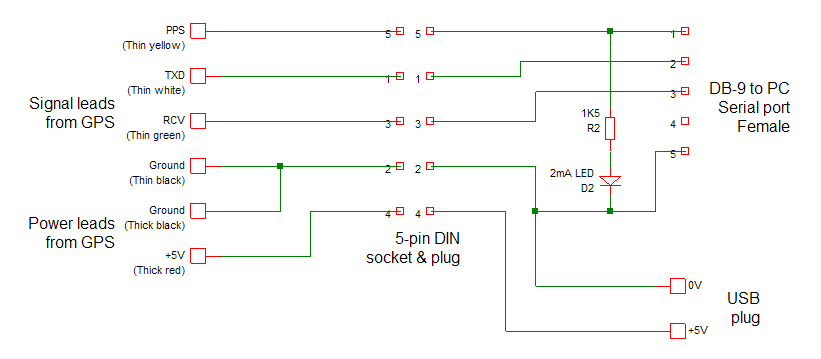
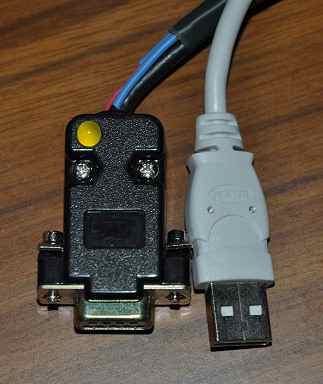
Interconnection - USB powerOn a later arrangement, which happened to be with the newer and more sensitive Garmin GPS 18x LVC (note the "x") I used the +5V USB power from the PC to service the needs of the GPS. It's well within the capabilities of the USB port. The GPS went faulty at one stage and had to be returned to Garmin (who replaced it quite quickly - there is a suggestion that it's actually a firmware fault). To avoid the hassle of having to solder the device connections to the RS-232 connector once again, I used a couple of 5-way DIN connectors (not ideal, I know) to connect the new GPS into the old cable, so now I have a 10m lead if I need it! It makes for a very simple and "clean" interface. Although I needed to have the GPS 18 on the roof outside, the GPS 18x is sufficiently sensitive to work indoors (at least on the top storey of the building). If you want a pre-assembled unit with USB power and serial RS-232 connectors, you could try here. Be sure to specify the USB power option. Dave Hart bought and comments: "I've bought two, which were shipped promptly. The USB and GPS cables meet in the DB-9 serial port hood. The fit and finish is good." As noted here, be sure to use firmware version 3.70 (possibly or later). Brian Inglis writes: I simplified the wiring by connecting all +5V power leads to pin 6 DSR. I connect USB power to the DB-9 pins 5/GND and 6/DSR (+5 V) and also connect the GPS GND and power leads to those pins. As the GPS is connected as a DCE (comms/modem) where pin 6 is an output, and the PC as a DTE (terminal/device) where pin 6 is an input, no RS-232 interface should have a problem with +5 V input on DSR. Nice one, Brian! See Wikipedia for a definition of DCE and DTE.
SoftwareSoftware installationAt the time of starting (around 2006) it seemed to be acknowledged that FreeBSD was the best operating system for accurate time keeping, so that's what installed having no other particular preference. Today, Linux may be equally as good - I haven't compared the two. It is also possible to use the same hardware with Linux 2.6, and Philip M White has described how to do this. The FreeBSD formal documentation is here. You can download the BSD 5.4 ISO disk images from here. This is the version which I heard that other people use, and it has worked fine for me. I can't comment from experience if newer versions are any better. You can use the IsoBuster program to extract the floppy disk images from the ISO. You use the fdimage program to make floppy disks to boot from if, like me, your CD-ROM doesn't boot. There is a boot floppy, and two Kernel floppies. There's a fourth fixit floppy, but I didn't appear to need that. When choosing the type of distribution, be sure to install the source so that you can re-compile the Kernel. It seems that I could have saved myself a lot of time by using Smart Boot Manager. Geoff Rhodes writes:
Since I wrote my original comments, Ryan Doyle has written up
his notes on setting up the Garmin 18
LVC on the (rather more recent) FreeBSD 8.0. FreeBSD Unix commands
System software configuration
System software customisationNeed to add one line to the Kernel configuration: options PPS_SYNC and recompile the Kernel. On my 133MHz/48MB system this can take several hours. Note the configuration suggestions below before you recompile the kernel. Harlan Stenn comments:
Kevin Oberman comments:
Harlan Stenn continues: I also add the lines:
Per Hedeland comments:
Dag-Erling Smørgrav noted on the NTP-Timekeepers list:
There is some interesting information about configuring a single-board computer to do this job here:
NTP configurationNTP is configured by the file /etc/ntp.conf. My simple version contains: # ntp.conf # driftfile /etc/ntp.drift # # The servers for sanity # server 0.uk.pool.ntp.org iburst server 1.uk.pool.ntp.org iburst server 2.uk.pool.ntp.org iburst server ntp2.mcc.ac.uk iburst # # The GPS receiver on COM1 at 4800 baud # # mode 1 = use $GPRMC statements # time1 = trimming offset # flag3 1 = enable Kernel PPS discipline # server 127.127.20.1 mode 1 prefer fudge 127.127.20.1 time1 0.000 flag3 1 refid PPS What does the fudge line do?The fudge command allows me to adjust certain parameters of the specified server. In this case, I alter:
An update to the configurationOnce I had the two Windows PCs working as stratum-1 servers, I could remove one feature I had been slightly unhappy with - that the backup Internet servers were being hit once a minute with the version of NTP and the configuration I had. I decided to replace two of the external Internet servers by the stratum-1 servers on my LAN, and the third external server by another PC on the LAN, providing four total servers (the GPS and three external). These three servers are shown as 192.168.0.1 etc in the configuration file below. This allowed me to reduce the poll interval for the GPS device from 64s to 16s, and gain an improved performance (I hope). # ntp.conf # driftfile /etc/ntp.drift # # The servers for sanity # server 192.168.0.1 iburst server 192.168.0.2 iburst server 192.168.0.3 iburst # # The GPS receiver on COM1 at 4800 baud # # minpoll = use 16-second sampling # mode 1 = use $GPRMC statements # time1 = trimming offset # flag3 1 = enable Kernel PPS discipline # server 127.127.20.1 minpoll 4 mode 1 prefer fudge 127.127.20.1 time1 0.000 flag3 1 refid PPS Useful NTP commands
ntpd maintains a "Most Recently Used" (MRU) list of source IP addresses seen in incoming NTP packets.
This list serves two Showing before and after PPS_SYNC enabled in the Kernel
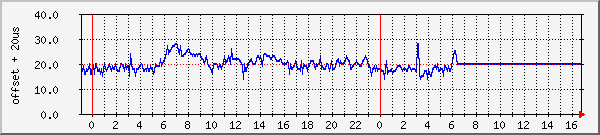
How well does it work? Here is a graph showing the offset from UTC reported by the PC, with 20µs added so that the offset is positive. (An ideal timekeeper would be a straight line at 20µs). As the offset value reported by NTPQ is only accurate to 1µs, increasing the plotted time resolution would not provide more information. Please remember that this is a lowly 133MHz processor system! How I make these plots. Performance history. All NTP plots. The graph shows the performance up to the point of switch off on 2009 March 24. So far, with NTP, my experience in terms of the accuracy achieved depends on the server source, and client operating system. Briefly: Good:
Better:
Best:
System configuration updates require to run NTP
Startup sequence after reboot - a set of ntpq -p reportspixie# ntpq -p Temporary RetirementAfter several years of faultless active service from January
2006, this system
was retired on 2009 March 24, as satisfactory performance had been obtained from
a Windows system running a serial GPS NMEA port and a special serialpps.sys
serial port drive with the ATOM reference clock. However, now that I have
a second GPS 18 LVC (actually an 18x), so I have three NMEA/PPS signals
available with parallel connecting one GPS, in March 2010 I decided to resurrect
the FreeBSD box to have even better timekeeping performance, however its PSU
failed on Monday, March 29, so I am temporarily without a FreeBSD box. An Intel Atom systemIn April 2010 I replaced the old Intel Pentium 133Mhz box with a shiny new Intel Atom system, which runs at such low power that it doesn't need any cooling fan. The fun to be had getting the box to dual-boot FreeBSD and Windows is described below. Even more fun in this application was that the wire connecting to pin 1 of the serial port was broken at the RS-232 end of the header cable. It took some time to find that one! Current performance is shown here, and a snapshot of the kernel variables shows the following. (With later NTP versions you may need the command: ntpq -c kern <server>).
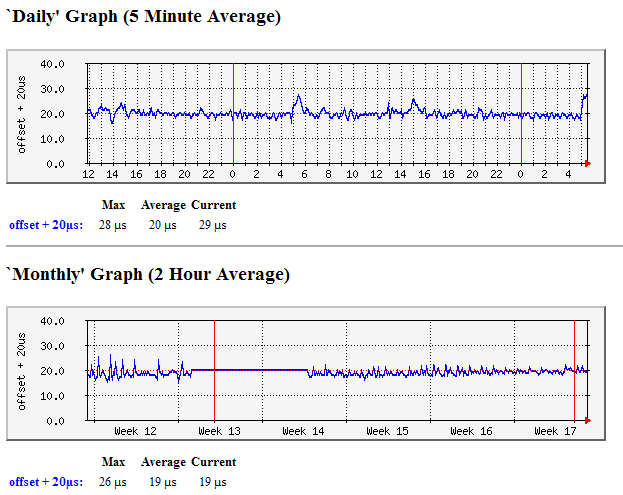
Note that there are calibration errors, but they don't change in number. On the later Intel Atom system I was initially concerned to see 25 calibration errors after a reboot, but the count was the same days later. As I now have a couple of stratum-1 servers based on Windows, the configuration file for PC Pixie is a little different. It may also be that the NTP ntpd 4.2.4p5-a (1) installed with the later FreeBSD 8.0 distribution would allow more flexibility. It has three sets of entries, the first for the GPS/PPS stratum-1 server with details similar to those listed above, the second is a set of three lines for external Internet servers from the UK pool, where both minpoll and maxpoll are set to 10 (1024 seconds) so that minimum use is made of those servers, and finally a third set for the two local stratum-1 servers polled at 64 second intervals. These last two are probably superfluous, but don't seem to do any harm; 32 seconds is the remote poll interval I use for LAN-synced PCs. driftfile /var/db/ntp.drift # server 127.127.20.1 mode 0 minpoll 4 maxpoll 4 prefer fudge 127.127.20.1 flag1 1 flag3 1 refid PPS # server 0.uk.pool.ntp.org iburst minpoll 10 maxpoll 10 # pool server server 1.uk.pool.ntp.org iburst minpoll 10 maxpoll 10 # pool server server 2.uk.pool.ntp.org iburst minpoll 10 maxpoll 10 # pool server # server 192.168.0.2 iburst minpoll 5 maxpoll 5 # local stratum-1 server server 192.168.0.7 iburst minpoll 5 maxpoll 5 # local stratum-1 server How well does it work?Here are a couple of snapshots of the system at work:
At the left-hand side of the Monthly graph, you can see a few
days of data from the earlier FreeBSD system. which shows rather more daily
variation than does the current system. This improved performance is also
reflected in the daily data. However, it shows that even a lowly
133MHz/48MB Pentium system is quite up to the NTP task. The current data
may be seen here. GPS 18x LVC firmware version issueIf you are using a Garmin GPS 18x LVC, be sure to use firmware either 3.20 or before, or 3.70, as there is a problem with some versions of the firmware where the NMEA data can be more that one second late compared to the PPS pulse, and hence present the incorrect time information to NTP. The problem, and my flawed attempts to analyse it, and a working solution are described here. Note that there is also an issue with some 3.x firmware which causes the device to stop working and appear bricked. Some notes on FreeBSD 8.0As mentioned above, this is well documented on Ryan Doyle's site although I stuck with the default shell and with the VI editor - these notes on vi are helpful for the novice or occasional user. HardwareI bought a pre-assembled ITX system from ITX Warehouse in the UK, who provided me with a W71 system built into a W42 box as that has the serial port on the rear of the case. The main board is an Intel Desktop Board D410PT. PPS supportYou will need to recompile the kernel to add PPS support. Follow the steps suggested by Harlan Stenn above. Allow an hour or two. Upgrading FreeBSD to 8.22012-Feb-09 - Basically, follow the notes here, using a command like: # freebsd-update -r 8.2-RELEASE upgrade Allow an hour! Note that the update will tamper with some system configuration files, including those for remote access and for ntpd. If you don't check this, you may find you cannot log in remotely any more, as the sshd daemon is no longer running! You may get a "Network error: Connection refused" error message. Check /etc/ssh/ssh_config Updating NTP to a later versionYou need a port management package such as Portmaster, which you can install as described here. First install the ports if you didn't at initial install: # csup -L 2 -h cvsup.FreeBSD.org /usr/share/examples/cvsup/ports-supfile then install Portmaster: # cd /usr/ports/ports-mgmt/portmaster # make install clean You may need to log out and back in at this point, before running portmaster. # portmaster -a To update NTP using portmaster, use one of these commands: # portmaster ntp # portmaster net/ntp-devel to get either the current release version, or the current development version. The portmaster step takes about 5 minutes on my Intel Atom PC. After updating to the release version (4.2.6p5@1.2349), the "*" tally code in "ntpq -p" changed to "o", the normal indication that PPS support was enabled. After updating to the development version, the command "ntpq -c kern pixie" returned the kernel information correctly from the remote PC. The new ntp binary files compiled by these ports typically appear in a directory like: /usr/local/sbin, and you need to stop ntpd, copy the updated files, and restart ntpd. Something like: # /etc/rc.d/ntpd stop # cp /usr/local/sbin/ntp* /usr/sbin/ # /etc/rc.d/ntpd start You may want to take a backup copy of the current working files first! Chuck Swiger has kindly mentioned: FreeBSD port-management tools like portmaster and portupgrade can download and install precompiled packages instead, if you tell them to (see the -P flag). Thanks, Chuck, that should help speed things up if a precompiled is available. With more recent versions of NTP (4.2.6 and later) you can replace the multiple server ... pool lines with a single pool directive: driftfile /var/db/ntp.drift # server 127.127.20.1 mode 0 minpoll 4 maxpoll 4 prefer fudge 127.127.20.1 flag1 1 flag3 1 refid PPS # pool uk.pool.ntp.org iburst minpoll 10 maxpoll 10 # server 192.168.0.2 iburst minpoll 5 maxpoll 5 server 192.168.0.7 iburst minpoll 5 maxpoll 5 # leapfile /root/ntp/leap-seconds.3535142400 Updating the updater - telling portmaster about a newer versionSuppose that portmaster knows about ntp4.2.7p304, but you know that a later version has been released and wish to build that. Here's a note from Steve Kostecke telling how: You don't need to wait until someone else updates
portmaster. Just update the port to the current version of
ntp-devel. Doing so usually works unless there is a significant enough change in
the port codebase to "break" the port. # cd /usr/ports/net/ntp-devel # nano MakefileEdit the Makefile with nano (or whatever) and update the version string, for example, change the line: PORTVERSION= 4.2.7p304 to: PORTVERSION= 4.2.7p401Then run this command while still in the ntp-devel directory: # make makesum You can then follow the same sequence of commands as above to replace the current NTP binaries with the ones you have just compiled. The portmaster step takes about 5 minutes on my Intel Atom PC. # portmaster net/ntp-devel # /etc/rc.d/ntpd stop # cp /usr/local/sbin/ntp* /usr/sbin/ # cp /usr/local/sbin/ntpq /usr/bin # this needed with FreeBSD 10.1 # /etc/rc.d/ntpd start # ntpq -crv -pn # optional, to check the new version number and that NTP is working OK Dual-booting with Windows-7I know you may ask why, but as I am more familiar with Windows it was easier for me to set up the system using Windows-7 to start with, just to be sure that all the hardware was present and intact. When setting up the box, which has no CD/DVD drive, getting FreeBSD to dual boot with Windows-7 was "fun". I ended up installing FreeBSD 8.0 first, from DVD using a borrowed SATA drive (I've now bought one for such purposes). Once Windows-7 was installed, nothing else would boot, but by using EasyBCD I could get a new entry in the boot menu for FreeBSD. Would it boot? No, it would not! There appeared to be two issues - the file name wasn't correct - FreeBSD has a file named boot1 (which is on the installation DVD), but EasyBCD insisted on calling it something different. Easy solution, copy boot1 to the file name it expected! Still didn't work, and I suspect this was due to the file being in a sub-directory created by EasyBCD. Solution, use the Windows-7 BCDedit command to say that the file was in the root directory, and move it there as well. Remote AccessWith the previous FreeBSD installation I had been able to login with Telnet, but in spite of following these instructions, I could not get this to work with root login. As SSH seemed to be the "correct" route today, I enabled SSH and followed these instructions to allow root over SSH, and found this SSH add-on for my existing TeraTerm PRO terminal emulator for Windows. I haven't yet found how to make challenge/response the default for SSH, though. You can make a shortcut to automate the SSH option like this: "C:\Program Files\TTERMPRO\ttssh.exe" 192.168.0.103:22 /ssh A program which I found later and which appears more versatile is PuTTY. NetworkingAs I had deliberately not set the IP address during testing, I needed to add both that, the DNS servers, and the main router address after installing FreeBSD. Notes here. This needed the magic commands: To set the IP address: # ifconfig ath0 inet 192.168.0.103 netmask 255.255.255.0 To set the default gateway and DNS server: # route add default your_default_router # echo "nameserver your_DNS_server" >> /etc/resolv.conf NTP configurationAs I now have two Windows PCs also running as stratum-1 servers, I have a slightly different configuration file, but I have still kept it simple. I note that FreeBSD 8.0 stores the drift file in a different location. driftfile /var/db/ntp.drift # # The GPS receiver on COM1 at 4800 baud # mode 0 = use any statements # mode 1 = use $GPRMC statements # minpoll 4 = use 16-second sampling # maxpoll 4 = and don't increase it # # flag1 1 = enable PPS processing # flag3 1 = enable Kernel PPS discipline # refid = text string to define the reference as ".PPS." # server 127.127.20.1 mode 0 minpoll 4 maxpoll 4 prefer fudge 127.127.20.1 flag1 1 flag3 1 refid PPS # # Local stratum-1 network servers # minpoll 5 = use 32-second sampling # maxpoll 5 = and don't increase it # server 192.168.0.2 iburst minpoll 5 maxpoll 5 server 192.168.0.7 iburst minpoll 5 maxpoll 5 # # Internet backup servers # maxpoll 10 = use 1024s sampling # minpoll 10 = and don't decrease it # server 0.uk.pool.ntp.org iburst minpoll 10 maxpoll 10 server 1.uk.pool.ntp.org iburst minpoll 10 maxpoll 10 server 2.uk.pool.ntp.org iburst minpoll 10 maxpoll 10 Leap-secondsIn February 2012 I updated PC Pixie with the NTP leapseconds file as detailed here: File is in: /root/ntp/leap-seconds.3535142400, and so I added this line to the /etc/ntp.conf: leapfile /root/ntp/leap-seconds.3535142400 I could check that the file had been seen by NTP by seeing the "tai=34" and other data in the output from an ntpq -c rv command, slightly emboldened below: pixie-ii# ntpq -c rv associd=0 status=0419 leap_none, sync_uhf_radio, 1 event, leap_armed, version="ntpd 4.2.7p255@1.2483 Fri Feb 10 06:04:36 UTC 2012 (1)", processor="i386", system="FreeBSD/8.2-RELEASE-p6", leap=00, stratum=1, precision=-19, rootdelay=0.000, rootdisp=1.165, refid=PPS, reftime=d2e7b51b.e633640c Thu, Feb 16 2012 17:02:19.899, clock=d2e7b527.0f680a5a Thu, Feb 16 2012 17:02:31.060, peer=8406, tc=4, mintc=3, offset=-0.001, frequency=28.050, sys_jitter=0.002, clk_jitter=0.002, clk_wander=0.001, tai=34, leapsec=201207010000, expire=201212280000 SNMPYou can install SNMP with a little help from these sites:
I find it amazing that these so-called install routines
actually appear to involve recompiling the software from scratch, so that should
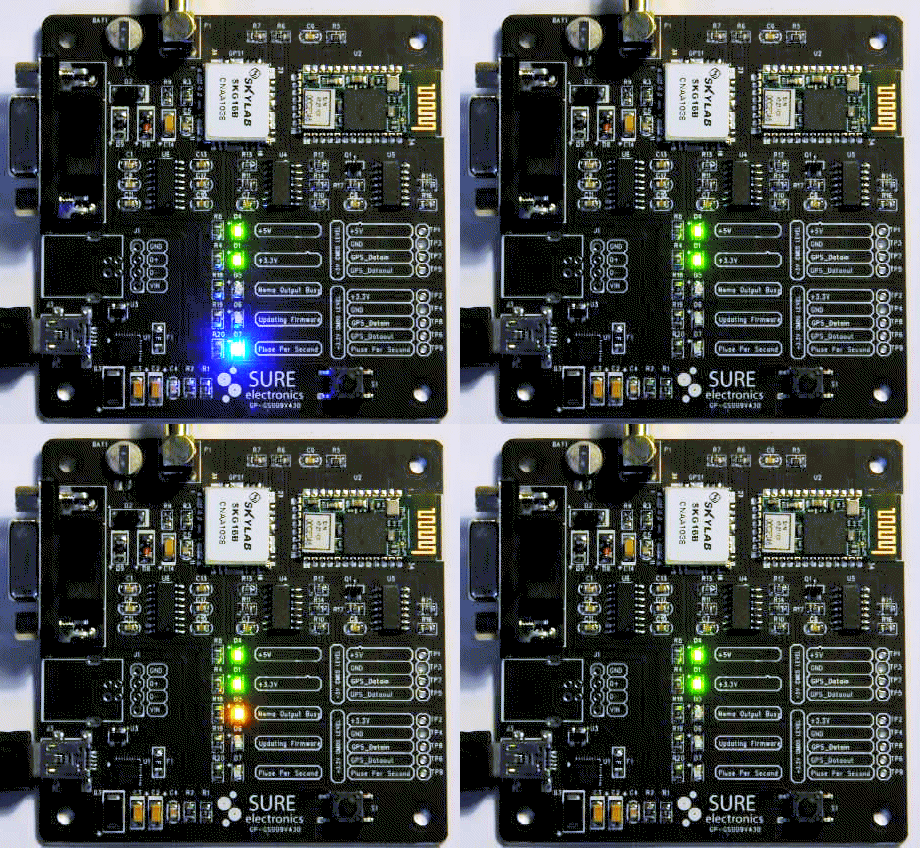
take a few seconds turns into a 30-minute job. Debian Lenny LinuxI was given this link by World Time Solutions which may help those configuring Debian Lenny Linux: http://www.worldtimesolutions.com/support/ntp/Debian_Lenny_Linux_PPS_support_for_ntpd.html Using the Sure Electronics GPS evaluation boardSome experiments using the Sure Electronics GPS evaluation board are described in more detail here.
|
| NTP users are strongly urged to take immediate action to ensure that their NTP daemon is not susceptible to use in a reflected denial-of-service (DRDoS) attack. Please see the NTP Security Notice for vulnerability and mitigation details, and the Network Time Foundation Blog for more information. (January 2014) |
Be sure to include restrict statements in your ntp.conf file such as:
# Suggestions for NTP restrictions:
restrict source notrap nomodify noquery
restrict 127.0.0.1
restrict ::1
restrict 192.168.0.0 mask 255.255.255.0 peer
I received much help from the kind folk in the comp.protocols.time.ntp newsgroup including Terje Mathisen, John Pettitt, Dave Hart, Steve Sommars and Harlan Stenn. Thanks, guys! For the FreeBSD 8.0 install Ryan Doyle's notes helped a lot.
|
|
 PDF -
PDF -